AI helps enterprises work faster. A Model Context Protocol (MCP) server enables secure, scalable integration between AI tools and Digi's remote management platforms, allowing organizations to automate workflows, access device data, and orchestrate infrastructure through standardized, enterprise-ready interfaces. By leveraging an MCP server architecture, businesses can extend intelligent capabilities across their managed device environments while maintaining centralized control and security.
Digi's remote management platforms include Digi Remote Manager for self-managed cellular deployments, and Genesis — the MSP portal for the Digi Ventus managed connectivity platform. Learn more about Digi Ventus managed solutions for MSPs.
What Is a Digi Model Context Protocol (MCP) Server?
A Digi Model Context Protocol (MCP) server connects AI platforms to Digi Remote Manager (DRM) and Genesis. It exposes device monitoring, configuration and management functions as standardized tool endpoints that AI systems can call.
This approach helps organizations move faster while keeping governance, visibility and security in place.
With a Digi MCP Server, you can:
- Query fleet data through secure, governed AI tools
- Diagnose device issues using natural language through any MCP-compatible AI assistant
- Maintain security and audit controls with API key authentication and role-based access
- Standardize AI-assisted workflows across teams and use cases
How the MCP Server Connects AI to Digi Remote Manager*
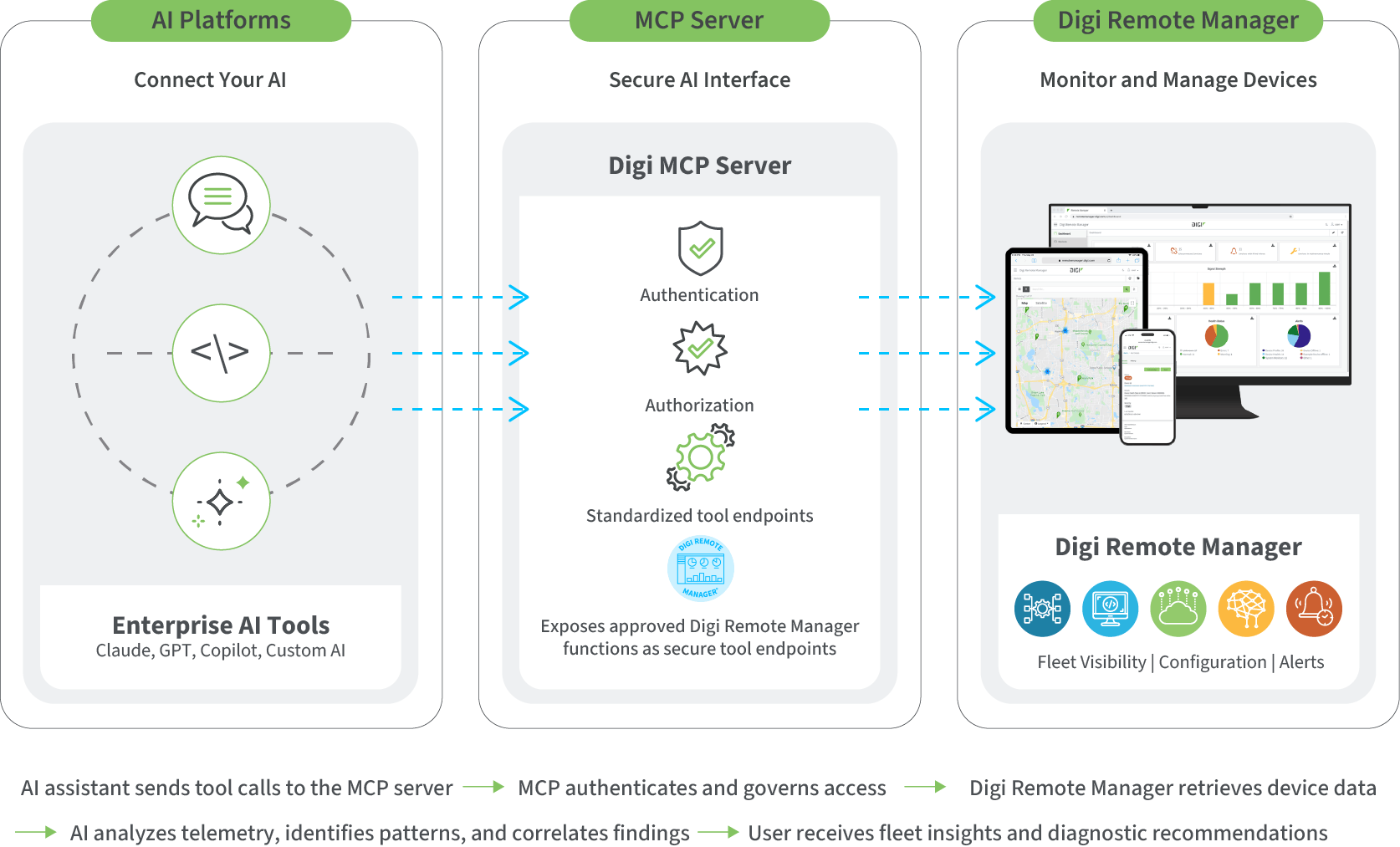
The Digi MCP Server acts as a secure intermediary between your AI applications and Digi Remote Manager. Instead of granting broad system access, it exposes only approved data and actions through defined interfaces.
When an approved AI platform submits a request, the MCP Server validates permissions, retrieves the required context from Digi Remote Manager and returns structured results. This model supports innovation while preserving enterprise governance and device integrity.
*A similar MCP server integration is also available for Genesis.
Why AI-Ready Infrastructure Matters
AI initiatives stall when teams have to build custom integrations from scratch, write brittle API scripts, or wait on engineering resources to connect AI tools to operational data. These approaches are slow to build, hard to maintain, and difficult to scale across teams.
The Digi MCP Server removes that friction. Built on Digi Remote Manager and Genesis, it gives any MCP-compatible AI assistant immediate access to your fleet data through standardized, well-defined tools. This enables you to:
- Connect your preferred AI platform to fleet data in minutes, not weeks
- Get consistent, reliable diagnostic insights across teams and use cases
- Reduce manual effort in monitoring and troubleshooting
- Scale AI-assisted workflows across global fleets without custom development
By providing a standard interface between AI and device management, the MCP Server lets organizations skip the integration work and go straight to operational value.
FAQ
What is the Digi MCP server?
The Digi MCP Server is a built-in interface that allows AI assistants to query Digi Remote Manager or Genesis using the Model Context Protocol (MCP) — an open standard for connecting AI tools to external data sources. It gives AI assistants structured access to fleet data including device status, signal metrics, event logs, configuration compliance, and more.
How do I connect my AI assistant?
Generate an API key in DRM, add the MCP server configuration to your AI client, and start asking questions. Setup takes minutes. Refer to the DRM User Guide for detailed instructions.
Do I need to modify my existing deployment to use the Digi MCP server?
No. The MCP Server is built into Digi Remote Manager. It reads data from your existing account — no changes to your devices, groups, or configurations are required.
What types of AI platforms does the Digi MCP server support?
The Digi MCP server is compatible with any AI platform that supports the Model Context Protocol (MCP), including desktop AI assistants, IDE-based coding tools, and custom AI applications. Refer to the DRM User Guide for setup instructions specific to your platform.
How is access controlled?
Access is governed through DRM API keys, which inherit the permissions of the user account that created them. Standard DRM role-based access controls apply — the AI assistant can only see what the associated user account can see.
How does the MCP server relate to Digi Genesis and Digi Ventus?
The Digi MCP Server supports both Digi Remote Manager and Digi Genesis — Digi's management platforms for self-managed and fully managed cellular deployments. This integration enables MSPs to connect AI tools to managed connectivity services, making it easier to automate network monitoring, diagnostics, reporting, and customer support workflows.
What benefits does MCP provide for MSPs using Digi Ventus?
For MSPs, MCP enables AI-driven operations at scale helping reduce ticket resolution time, improve visibility across customer environments, and automate repetitive tasks such as usage reporting, connectivity checks, and incident triage.