We're excited to announce the upcoming general availability of DAL OS 26.2 LTS — our second annual Long-Term Support (LTS) firmware release for the Digi Accelerated Linux operating system (DAL OS). Alongside this firmware milestone, we've been steadily shipping enhancements to Digi Remote Manager (DRM) that make managing your connected device fleet faster, smarter, and more intuitive. Here's what you need to know.
Software updates are vital to optimize performance, enhance user experience, and ensure a high level of security. Digi is committed to providing regularly scheduled firmware updates for our networking solutions — deploying security patches and bug fixes in a timely fashion while continuously introducing new features that expand what you can do with Digi cellular routers, servers, and infrastructure management systems.
DAL OS is fully integrated with DRM, and together these two software platforms give users and network managers visibility and seamless access to the full value of their devices — wherever they are deployed.
Get Our Brief
Lear about remote device management for the IoT
Download PDF
What's New in DAL OS 26.2 LTS
Remote Manager Integration Enhancements
Several improvements in 26.2 LTS make the device–cloud relationship more powerful and efficient:
- You can now trigger a SIM slot switch directly through the DRM API or Actions, making remote SIM management on multi-SIM devices a first-class operation.
- Reduced system overhead: We significantly optimized background cellular statistics collection — which runs every 10 seconds — reducing CPU and resource consumption on the device itself.
Faster firmware and file transfers: Block size changes to the EDP protocol dramatically speed up over-the-air firmware updates and file transfers (such as support report downloads) through DRM.
Smarter Cellular APN Handling
Cellular connectivity is the heart of a Digi router, and 26.2 LTS brings several improvements to how devices select and use APNs:
- The default APN selection now uses Digi's curated built-in APN list, streamlining initial cellular connection by eliminating trials of esoteric or carrier-specific APNs that rarely apply.
- Custom APN configurations can now be scoped to a specific carrier or PLMN ID — making multi-SIM deployments with different carriers dramatically easier to configure.
- vzwinternet has been moved to the top of the Verizon built-in APN list, and broadband / nrbroadband are now prioritized at the top of the AT&T list, speeding up first-connect time for the most common use cases.
Redesigned Web UI
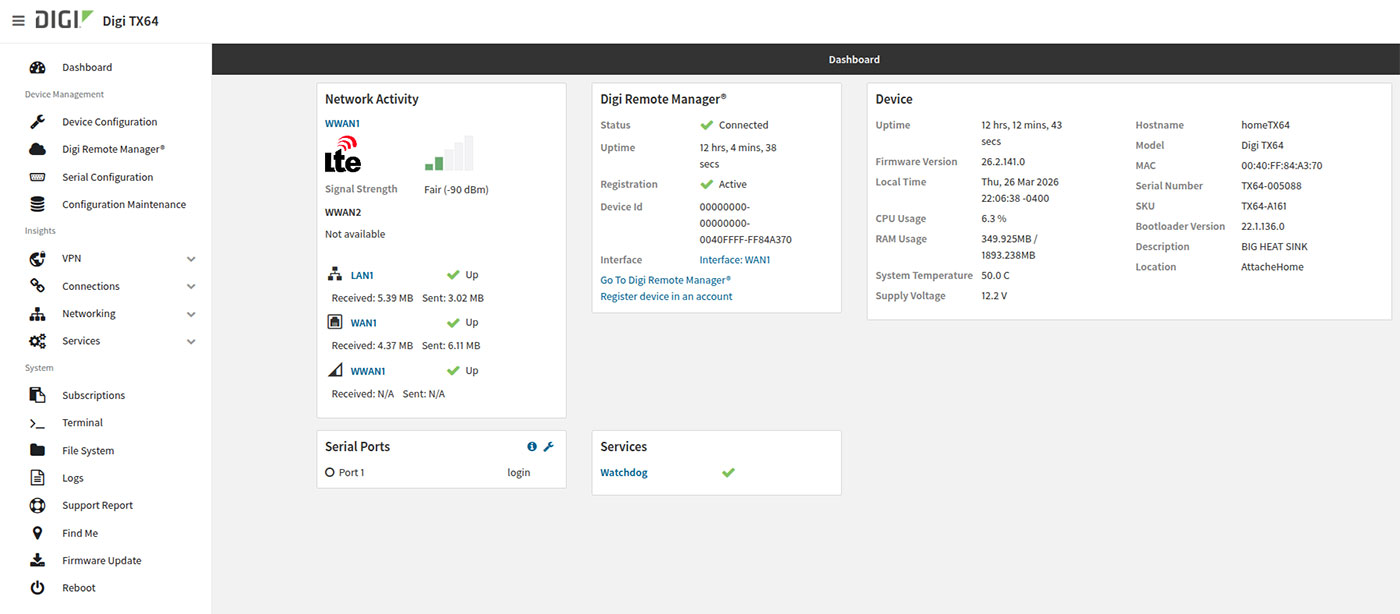
The local device web UI received a major facelift in 26.2 LTS. It now matches the DRM layout and format, featuring a left-side navigation bar that brings a consistent experience across local and cloud management. Beyond the visual refresh, the Device Configuration page loads up to 10x faster — even on devices with complex configurations, extensive firewall rules, or many serial and USB port peripherals. What used to take many seconds now loads in under one second.
WAN Bonding Improvements
Custom settings (local or server-side overrides) applied to the saneclient WAN bonding configuration now persist across reboots. Previously these had to be re-applied each time the device connected — that limitation is now resolved.
SNMP and Container Enhancements
- SNMP now supports SHA-2 and AES encryption and hashing options, aligning with modern security standards.
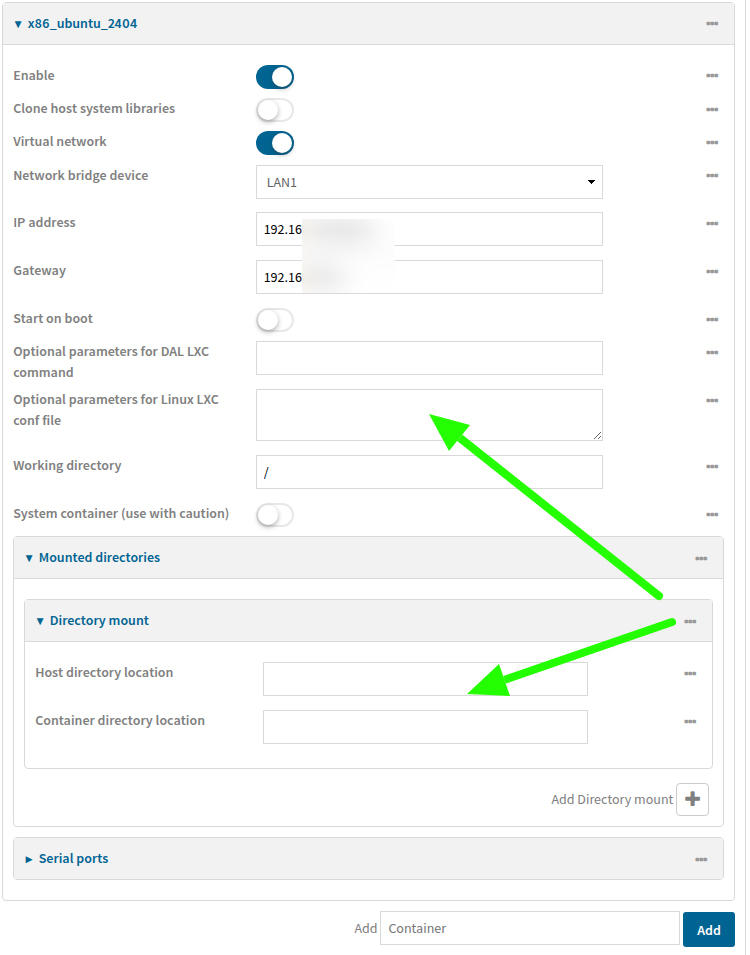
- Container configuration received new options for custom LXC startup settings and expanded directory mounting/symlinking capabilities — enabling more sophisticated edge containerized workloads.
Digi IX25 Updates
For customers using the Digi IX25 cellular router, 26.2 LTS delivers:
- A new Thermal Monitor system power profile that dynamically reduces power draw and sheds non-critical services when the device detects elevated CPU temperatures — ideal for high-temperature enclosures or solar/battery-powered installations.
- OS Activation Mode — a new product registration mechanism for the IX25 and future Digi products. Devices perform a one-time initial connection to Digi Remote Manager to activate, permanently binding hardware warranty and subscription details to the account. Once activated, the device is fully functional for its lifetime — even without an ongoing subscription.
MNaaS-Driven Improvements (Available to All Customers)
 Several enhancements developed as part of the Digi/Ventus MNaaS solution are broadly beneficial:
- VPN connection type in DRM now identifies when a device is connected to DRM over an IPsec or GRE tunnel, providing clearer visibility into how a device is reaching the cloud.
- Devices now immediately notify DRM of any local configuration changes, triggering an instant template scan and remediation. This tightens compliance enforcement and closes the gap between local edits and centrally managed policy.
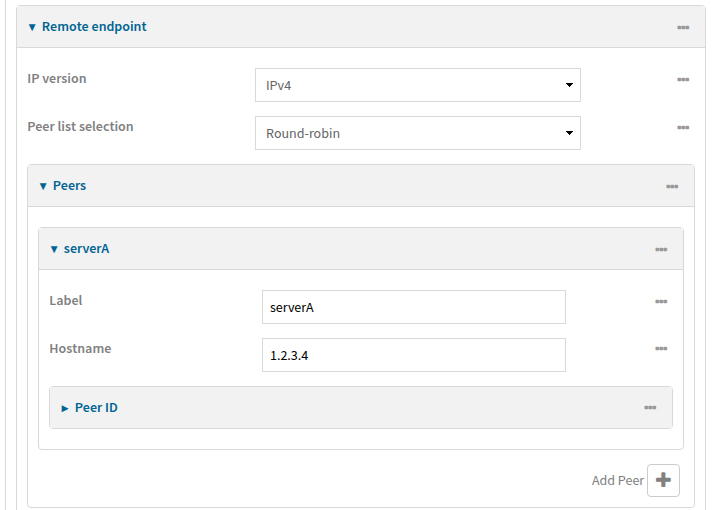
- IPsec remote peer endpoints can now be assigned a friendly label name, surfaced in the CLI, web UI, and DRM — making multi-tunnel configurations easier to manage.
- Added proper transport tunnel dependency handling for GRE-inside-IPsec configurations.
FIPS 140-3 Validated
We're proud to announce that DAL OS has achieved FIPS 140-3 validation, issued February 13, 2026, and valid through March 10, 2030. This upgrades our standing from FIPS 140-2 compliant (achieved approximately three years ago) to the newest and most stringent level of NIST cryptographic validation.
FIPS 140-3 tightens the requirements by permitting only approved cryptographic algorithms and applying additional scrutiny to software component vetting. Importantly, this validation applies universally across all products running DAL OS — not limited to specific SKUs or hardware configurations. For customers in government, defense, healthcare, and regulated industries, this is a meaningful differentiator: one OS, one validation, any Digi platform.
What's New in Digi Remote Manager
MCP Server — Now Generally Available
Digi Remote Manager now includes a generally available MCP (Model Context Protocol) server, enabling AI agents and tools such as Cursor, Claude, and others to connect directly to your DRM account. Account administrators can enable MCP server access under Account Settings.
Once connected, an AI agent can query device status, data streams, user information, and more — making it a powerful tool for fleet insights, troubleshooting, and workflow automation. If you've ever wanted to ask a natural language question about your device network and get an actionable answer, this is the feature for you.
Quick Filters (Saved Searches)
Device list searches can now be saved and recalled with a single click. A new floppy disk icon in the search bar lets you name and save any current filter — whether it's filtering by device type, connection state, health status, or any other column attribute. Saved filters are always available to quickly slice your fleet view without re-entering search criteria each time.
Read-Only Device Settings When Template-Managed
To reduce configuration confusion, device settings are now displayed in read-only mode when a device is managed by a Template. A clear banner at the top of the settings view communicates that the Template is the source of truth, and directs users to either edit the Template or place the device in debug mode before making changes. This closes a common support scenario where local changes were silently overwritten on the next template scan.
Multi-Select Column Filter Buttons
Column headers in device lists now include multi-select filter buttons. Instead of requiring users to know the exact keyword to type, clicking a column filter now presents all valid options as selectable checkboxes — making it far easier to filter by connection type, health status, and other attributes.
Sub-Account Firmware Notification Control
Parent account administrators can now control whether firmware out-of-date warnings are shown to sub-accounts, and whether sub-accounts can override that setting. This addresses a common enterprise requirement where centralized IT teams manage firmware governance and don't want sub-account users acting on update prompts independently.
Additional Enhancements
- eSIM Registration tab in the UI
- Template settings changes now correctly move devices into "unknown" compliance state
- Notifications for device add/remove events include up to 20 device IDs
- Support for 18-character ICCIDs
Security Updates
26.2 LTS includes an updated LTS Linux kernel (version 6.18.1) as well as updates many key components within the firmware. Check the release notes for a full list of security patches.
Who Should Update
- All LTS customers — 25.2 LTS will no longer receive security patch updates. Moving to 26.2 LTS is required to continue receiving security fixes, and also unlocks all features from the 2025 feature releases (including 5G multi-slicing, eSIM support, Enhanced Location Services, and expanded query_state metrics).
- IX25 users — 26.2 LTS is now the manufacturing baseline for IX25s. If you're running a pre-release or beta firmware, update to align with the production baseline.
Note: Digi EX50 and Digi TX40 are not included in this LTS release due to Wi-Fi kernel driver issues currently being resolved. A patch release targeting those platforms will follow once those driver updates are complete.
Full Changelog
For full details on bug fixes, security updates, and additional enhancements by product family, please see the release notes on the Digi documentation portal.
For any questions or assistance updating your devices, please contact the Digi Support team.
Next Steps