USB-Over-IP

Industry Leading USB Connectivity

More Speed, More Power and More Security

Strategies To Improve Security Posture and Agility at the Edge
Speed

Maximize USB-Over-Network Speed

Digi AnywhereUSB Plus uses USB 3.1 gen 1 Type A ports. While directly connected USB devices can reach speeds of up to 5 Gbps, due to the AnywhereUSB protocol and IP network constraints, AnywhereUSB Plus performance will be slower. To maximize performance, use USB cables rated for USB 3.1 or higher, and connect devices directly to AnywhereUSB Plus, avoiding intermediate hubs.

Speed Details
Secure

Industry-Leading USB Hub Security

The TLS certificate-based security of Digi AnywhereUSB Plus is uniquely encrypted to protect sensitive financial, personal and technical data across a network. Plus, Digi TrustFence is built in, which enables industry-leading security certifications such as FIPS 140-3 and NIST for government and military, PCI-DSS for retail, HIPAA for healthcare and FDA for healthcare devices.

Security Details
Configurable

Many USB Configuration Options and Benefits

Digi offers the flexibility of 2-, 8- and 24-port models for both low- and high-density device management. Multiple USB hubs can be daisy-chained or interconnected to manage as many as 127 USB connected devices. AnywhereUSB Plus gives you control to access and assign specific ports or groups of ports at an individual or user group level to give different clients access to one or more smart devices.

Configurability Details
Flexible

Simultaneous Data Transfer and Charging USB Hubs

Digi AnywhereUSB Plus devices are flexible, fast and powerful — supporting simultaneous charging and data transfer in a range of demanding environments. The compact 2-port model and the 8-port model are desktop or panel mountable. The AnywhereUSB 2 Plus is available with an optional DIN rail mounting kit. The AnywhereUSB 24 Plus is rack mountable with two power supplies. Each model is upgradable to support LTE Cellular connectivity.

Flexibility Details
Easy

Easy Set-up — Especially for Large Deployments

Digi AnywhereUSB Plus provides an intuitive web experience to configure and manage permissions on a group or individual basis. And you can quickly group any number of devices and apply the same configuration to all of them for rapid deployment using the Configuration Manager tool included with Digi Remote Manager.


Connect USB peripheral devices anywhere on a Local Area Network (LAN) via Ethernet without a locally-attached host computer

 
  • Connect USB security devices, dongles, and peripherals to remote PCs, VMs, and servers over IP
  • 2-, 8-, and 24-port USB 3.1 Gen 1 models; daisy-chain up to 127 devices
  • TLS-encrypted USB-over-IP with FIPS-140-2, PCI-DSS, and HIPAA-aligned security via Digi TrustFence
  • Centralize USB dongles, HSMs, and programming tools in a secure rack with network-based access control
  • Windows service mode for 24/7 unattended access — license servers, code signing, and automated build pipelines
  • RDP USB redirection support — smart card, RemoteFX, and WebAuthn workflows
  • Assign port groups to users or teams for controlled, auditable access via Digi Remote Manager
  • 1-year LifeCycle Assurance — includes 24x7 Expert Support and Digi Remote Manager Premier (cloud or on-prem)
  • This product is compliant with the U.S. Trade Agreements Act (TAA) based on its current country of origin and manufacturing configuration. Compliance status is subject to change. Customers should contact Digi International to obtain the latest TAA Compliance Statement.

USB Connectivity Anywhere

Rapidly deploy, configure, secure and manage devices at any distance

IoT business automation requires communication with various IT assets and peripherals located across an enterprise. Digi AnywhereUSB Plus remote USB hubs give users the simplest and most direct connection options for existing equipment with a variety of USB 3.1 Gen 1 port options.

All models have Gigabit Ethernet support. 8- and 24-port models support 10 GB Ethernet with the option to use SFP+ connectors for fiber network connectivity. The 24-port models support dual Ethernet or dual SFP+ and optional Ethernet bonding for higher speeds and/or failover redundancy. 

Digi AnywhereUSB 24 Plus is rack mountable with 24 USB 3.1 Gen 1 ports, while AnywhereUSB 8 Plus is desktop or rack mountable (with included rack ears) and AnywhereUSB 2 Plus is desktop or panel mountable with eight or two ports, respectively, and support for Gigabit Ethernet. For enterprise and industrial customers who need remote or local USB ports and the higher speeds of USB 3.1 Gen 1 and Gigabit/10 Gigabit Ethernet, Digi AnywhereUSB Plus products give you an industry-leading connectivity solution.

Digi AnywhereUSB Plus provides a consistent, secure and cost-effective way to verify that your IoT infrastructure is configured correctly and fully operational as it continues to expand. It allows for flexible methods to test, provision, confirm and resolve any connectivity issues related to scaled deployments of IoT devices. Digi AnywhereUSB Plus lets you readily manage a large volume of USB devices with minimal effort.

Increase Security Posture and Agility

As a network of USB IoT devices expands, the risk of cyber attacks increases. Network engineers need to take proactive measures to increase the security posture of their network. AnywhereUSB Plus coupled with SOC 2 Type 2-compliant Digi Remote Manager (cloud-based), or Digi On-Prem Manager (local), protects your peripheral devices and gives you the security agility needed to keep your networks safe.
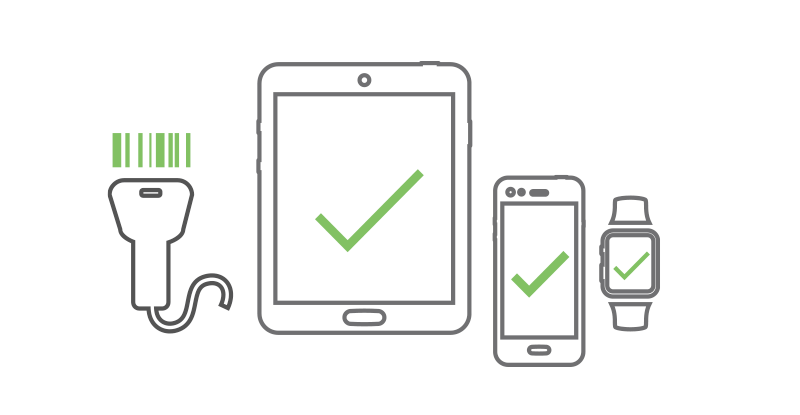
Deploy & Manage USB Devices Over IP
Deploy and Manage USB Devices Over IP
Connect to almost any USB device, anywhere. Manage up to 24 USB devices over IP. Recharge or install firmware updates on barcode scanners, receipt printers, credit card readers, point of sale terminals, cameras, scales, monitors, in-store kiosks, security check-in stations, telephone systems, removable disks, license dongles and more.
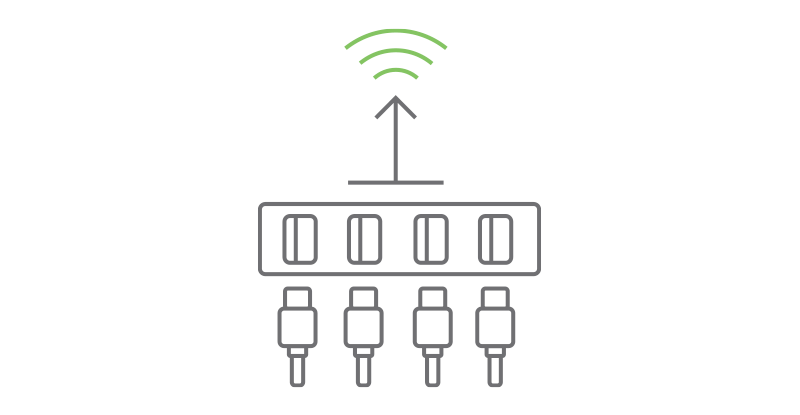
Centralize Network USB Connections
Digi AnywhereUSB Plus remote hubs let you manage USB assets over IP, beyond the limit of USB cable distances. Computers can be centralized, virtualized or positioned in racks to reduce the amount of equipment in a work area, improve security, and streamline configuration and testing.
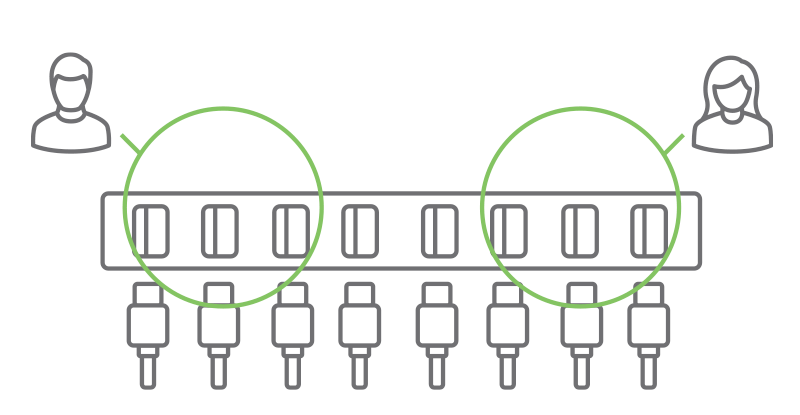
USB Hub With Flexible Connectivity Options
Efficiently Manage USB Hubs With Flexible Connectivity Options
Group USB ports within one remote hub to give different clients access to one or more of these groups of smart devices. Different users can then access only the equipment they need to work with, as they need it, without affecting access to any other devices being managed.

USB Over IP Solutions To Improve Security Posture at the Edge

Speed

Maximum USB Speed with AnywhereUSB Plus

Digi AnywhereUSB Plus uses USB 3.1 gen 1 Type A ports. While in direct connection environments these ports can achieve theoretical speeds of up to 5Gbps performance on AnywhereUSB Plus will be slower due to the nature of the AnywhereUSB protocol and the effect of the network.

To maximize transfer speeds, your USB cables should all be rated for USB 3.1 or higher, you should connect devices directly to the AnywhereUSB Plus and not add an additional hub downstream of the AnywhereUSB Plus. Also monitor the network connection between the AnywhereUSB Plus and the Computer that will access the devices to be aware of any capacity constraints on the network side.

Digi AnywhereUSB Plus is backwards-compatible with USB 2.0.

Secure

Security-Related Features in AnywhereUSB® Plus

The following features are built into every AnywhereUSB Plus device.

  • Unique password for each hub
  • Configurable network service port numbers
  • Secure access and authentication to the web UI and CLI
  • One password, one permission level
  • Selectively enable and disable network services such as mDNS, HTTP/HTTPS, and SSH
  • Encrypted access to AnywhereUSB® Plus traffic: Access to the USB-over-IP traffic is encrypted and authenticated by default and cannot be disabled
  • Protected by the Digi TrustFence® framework
  • Manage Digi AnywhereUSB Plus remotely and securely with Digi Remote Manager, a comprehensive IoT device management application
Secure

Connect USB Peripheral Devices Anywhere on a Local Area Network (LAN) Without a Locally-Attached Host

The following features are built into every AnywhereUSB Plus device.

  • Digi offers the flexibility of 2-, 8- and 24-port options (daisy-chain up to 127 USB devices)
  • Network-attached USB hubs easily connect USB peripheral devices to a PC from remote or virtual hosts
  • Ideal for connecting USB devices over the network in virtualized environments such as VMware®
  • Access and monitor USB and serial devices over TCP/IP connection
  • Supports multi-host connectivity for each USB port or group independently
  • Protocol support for HTTPS, FTP, SFTP, SSL, SMTP, SSH and CLI for web management
  • Remote management via Digi Remote Manager
Flexible

USB Hub Ruggedized for OT, Compatible with IT Closet

Whether you manage your enterprise operations, or you are responsible for network and device management, Digi AnywhereUSB Plus devices are designed to support the most demanding requirements.

Each USB expansion hub option operates reliably in severe conditions with a wide temperature range of 0˚ to 55˚ C (32˚ to 141˚ F) and 0˚ C to 40˚ C (32˚ F to 104˚ F) on Wi-Fi models

AnywhereUSB Plus models with 8 and 24 ports are software upgradeable to support Digi CORE® LTE Cellular modules and Wi-Fi connectivity.

AnywhereUSB 24 Plus is rack mountable with two power supplies and Ethernet connections for failover redundancy. The 2-port model has an optional DIN rail mount.

On-Screen Telestration Made Possible With Digi AnywhereUSB Plus

As the golfer steps up to the tee, the TV analyst uses his finger and a USB-connected infrared touchscreen to illustrate the challenges of the 14th hole. The graphics server is thousands of feet away. Considering the short-distance limitations of USB cable, ChyronHego turned to Digi.

“The Digi piece of our solution is relatively small, but it’s hugely critical to success in the field.”

Rob Rizzuto, Director of Field Operations for ChyronHego

Learn How

Increase Reliability of USB Devices in Harsh Environments

Harsh Environment USB SupportUsing Digi AnywhereUSB Plus helps keep your computer more stable and secure. Instead of placing your computer in a harsh environment like a commercial kitchen, Digi AnywhereUSB Plus connectivity lets you place the environmentally sensitive computer in a safe location such as the manager’s office or an IT equipment rack (Figure 1). Digi AnywhereUSB Plus software drivers are loaded on a remote computer, making the USB ports appear to be locally attached and allowing the USB device to be located far beyond the three or five meter USB hub distance limits. The USB-based printer, keyboard and monitor are positioned in the commercial kitchen as needed, but the main computer for the restaurant is safely housed in an office or secure closet away from the harsh conditions.

Increase Reliability of USB Devices in Harsh Environments

USB Dongle Server for Dynamic Access to Software Seat Licenses

Software with seat licenses can be managed by an accessible license file on a key fob or dongle required to run the software on a computer (Figure 2). Physically tracking license dongles can be problematic, as they’re easily lost or misplaced. By consolidating them in a Digi AnywhereUSB Plus acting as a remote dongle server, you can securely manage access, with each key available independently to users on individual workstations.

USB Dongle
USB Dongle Server for Dynamic Access to Software Seat Licenses

AnywhereUSB® Plus

Learn how to deploy, configure and upload firmware, control access to particular groups of smart devices, virtualize, manage, test, and even charge, tablets, phones, sensors, scanners or other programmable IoT devices…and do it all remotely.

Contact a Digi Expert
LifeCycle Assurance

Now With Digi Lifecycle Assurance

An enhanced level of service and support offered to protect critical connectivity systems.
Visit the LifeCycle Assurance webpage for further details on qualifying devices.

Management Management
Device Device
Technical Support Technical Support
Warranty Warranty

Featured Resources

Vallarta Supermarkets Resolves Outages Quickly with Digi AnywhereUSB Plus Vallarta Supermarkets Resolves Outages Quickly with Digi AnywhereUSB Plus See how California-based Vallarta Supermarkets found a solution to resolve cash register outages quickly during peak business... Length: 1:04 Watch Video 3 Essentials for Secure School Connectivity 3 Essentials for Secure School Connectivity From device connectivity to remote updates and out-of-band management, Digi has a solution to simplify your school technology management needs. View Solution Brief Digi Modernizes the Food and Beverage Industry Digi Modernizes the Food and Beverage Industry Connectivity overhaul leads to improved workflow, savings, and growth. View Solution Brief Solving for the Critical Needs of Today's Casinos Solving for the Critical Needs of Today's Casinos Technology has changed the casino industry forever, enabling IT teams to remotely manage slot machine and gaming table assets. View Solution Brief Introducing Digi LifeCycle Assurance for Digi Infrastructure Management Solutions Introducing Digi LifeCycle Assurance for Digi Infrastructure Management Solutions So, you’re preparing to plan and deploy connectivity across a retail, school campus, supply chain, or industrial complex. If... Length: 00:51 Watch Video Enhanced Service and Support to Protect Critical Systems Enhanced Service and Support to Protect Critical Systems In a world of increasingly complex connectivity challenges, Digi is creating solutions that provide security, reliability, simplicity, and scalability. Standing behind our commitment to providing the best IIoT connectivity results, Digi introduces LifeCycle Assurance to protect critical systems. View Solution Brief Securing Educational Technology Securing Educational Technology Today’s educational institutions are faced with a variety of security challenges that pose risks to networks, devices, and sensitive data. View Solution Brief Seamless Data Transmission Over TCP/IP Solution Seamless Data Transmission Over TCP/IP Solution Digi AnywhereUSB® 2 Plus provides a stable and reliable solution for complex industrial operations View Solution Brief Registering Your New Device with Digi LifeCycle Assurance Registering Your New Device with Digi LifeCycle Assurance So, you have your new device in hand and you’re ready to set it up. Watch our short video to learn about first steps to get all... Length: 1:07 Watch Video Boosting Broadcasting and Media Efficiency Boosting Broadcasting and Media Efficiency Digi AnywhereUSB® Plus streamlines USB connectivity for enhanced media management and workflow flexibility. View Solution Brief Overcoming Subsea Communication Challenges Overcoming Subsea Communication Challenges Digi AnywhereUSB® Plus enhances depth-to-surface data transmission. View Solution Brief Sharper Vision Starts with Stronger Connectivity Sharper Vision Starts with Stronger Connectivity Digi reinvents USB connectivity for telehealth. View Solution Brief Elevating Healthcare Networks Elevating Healthcare Networks Healthcare IT is transforming how care is delivered and managed. As hospitals adopt more complex technologies, maintaining a resilient and secure IT infrastructure is critical. View Ebook The Ultimate Hookup The Ultimate Hookup Orchestrate edge-to-cloud connectivity with a unified suite of tools — rugged devices, secure networks, and centralized visibility. View Solution Brief
 
More related content
Digi AnywhereUSB 2 Plus
SKU: AW02-G300 AnywhereUSB 2 Plus
  • Dual USB 3.1 Gen 1 ports
  • 10 M / 100 M / 1 G Ethernet
  • 5 VDC
AW02-G300 How to Buy
SKU: AW02-G300-GLB Now available
AnywhereUSB 2 Plus
  • Dual USB 3.1 Gen 1 ports
  • 10 M / 100 M / 1 G Ethernet
  • 5 VDC
  • Includes power supply
AW02-G300-GLB How to Buy
Digi AnywhereUSB 8 Plus
SKU: AW08-G300 AnywhereUSB 8 Plus
  • Eight USB 3.1 Gen 1 ports
  • 10 M / 100 M / 1 G / 10 G Ethernet
  • SFP+ module support
  • 12 VDC
  • Optional cellular Digi CORE module
  • Includes power supply and rack mount extension kit
AW08-G300 How to Buy
Digi AnywhereUSB 24 Plus
SKU: AW24-G300 AnywhereUSB 24 Plus
  • 24 USB 3.1 Gen 1 ports
  • Dual 10 M / 100 M / 1 G / 10 G Ethernet
  • Dual SFP+ modules support
  • Dual 100-240 VAC power
  • Optional cellular Digi CORE module
  • Includes rack mount extension kit
AW24-G300 How to Buy
Digi AnywhereUSB Plus Accessories
SKU: 76000682 Mounting Bracket – DIN Rail mounting kit 76000682 How to Buy
SKU: 76000965 AC Power Supply - Extd Temperature, Universal plugs (US, EU, UK, AU) to 5VDC - 2.5mm locking barrel plug 76000965 How to Buy
SKU: 1002-CMG4-GLB Digi CORE plug-In LTE modem — Global LTE Cat 4, 3G / 2G fallback
  • LTE Cat 4 with 3G / 2G fallback (Global)
  • Industrial temperature: −40 °C to 70 °C (−40 °F to 158 °F)
  • Cellular certifications: PTCRB, AT&T, Verizon, Telus, US, Canada, Europe
1002-CMG4-GLB How to Buy
Digi LifeCycle Assurance
Unparalleled connectivity solutions, service and support that stand behind our commitment to customer success
  Learn More
SKU: DIGI-IM-LCA-1YR-EXT Digi LifeCycle Assurance — 1-year extension DIGI-IM-LCA-1YR-EXT How to Buy
SKU: DIGI-IM-LCA-2YR-EXT Digi LifeCycle Assurance — 2-year extension DIGI-IM-LCA-2YR-EXT How to Buy
SKU: DIGI-IM-LCA-3YR-EXT Digi LifeCycle Assurance — 3-year extension DIGI-IM-LCA-3YR-EXT How to Buy
SKU: DIGI-IM-LCA-4YR-EXT Digi LifeCycle Assurance — 4-year extension DIGI-IM-LCA-4YR-EXT How to Buy
SKU: DIGI-IM-LCA-RENEWAL Digi LifeCycle Assurance — renewal DIGI-IM-LCA-RENEWAL How to Buy
Digi LifeCycle Assurance with On-Prem Manager
Digi LifeCycle Assurance
Unparalleled connectivity solutions, service and support that stand behind our commitment to customer success
  Learn More
Digi On-Prem Manager
A locally hosted version of Digi's device management platform for organizations that cannot use cloud-based management due to security, compliance, or air-gap requirements. It provides the same device management capabilities as Digi Remote Manager but runs on the customer's own infrastructure.
  Get Started
SKU: DIGI-IM-LCAP-SERVER-1YR New
Digi LifeCycle Assurance On-Prem Manager Server License — 1-year subscription
DIGI-IM-LCAP-SERVER-1YR How to Buy
SKU: DIGI-IM-LCAP-SERVER-2YR New
Digi LifeCycle Assurance On-Prem Manager Server License — 2-year subscription
DIGI-IM-LCAP-SERVER-2YR How to Buy
SKU: DIGI-IM-LCAP-SERVER-3YR New
Digi LifeCycle Assurance On-Prem Manager Server License — 3-year subscription
DIGI-IM-LCAP-SERVER-3YR How to Buy
SKU: DIGI-IM-LCAP-SERVER-4YR New
Digi LifeCycle Assurance On-Prem Manager Server License — 4-year subscription
DIGI-IM-LCAP-SERVER-4YR How to Buy
SKU: DIGI-IM-LCAP-SERVER-5YR New
Digi LifeCycle Assurance On-Prem Manager Server License — 5-year subscription
DIGI-IM-LCAP-SERVER-5YR How to Buy
SKU: DIGI-IM-LCAP-1YR-EXT New
Digi LifeCycle Assurance On-Prem Manager Device License — 1-year extension
DIGI-IM-LCAP-1YR-EXT How to Buy
SKU: DIGI-IM-LCAP-1YR-REN New
Digi LifeCycle Assurance On-Prem Manager Device License — renewal
DIGI-IM-LCAP-1YR-REN How to Buy
SKU: DIGI-IM-LCAP-2YR-EXT New
Digi LifeCycle Assurance On-Prem Manager Device License — 2-year extension
DIGI-IM-LCAP-2YR-EXT How to Buy
SKU: DIGI-IM-LCAP-3YR-EXT New
Digi LifeCycle Assurance On-Prem Manager Device License — 3-year extension
DIGI-IM-LCAP-3YR-EXT How to Buy
SKU: DIGI-IM-LCAP-4YR-EXT New
Digi LifeCycle Assurance On-Prem Manager Device License — 4-year extension
DIGI-IM-LCAP-4YR-EXT How to Buy
SKU: DIGI-IM-LCAP-5YR-EXT New
Digi LifeCycle Assurance On-Prem Manager Device License — 5-year extension
DIGI-IM-LCAP-5YR-EXT How to Buy
Digi Remote Manager
Digi Remote Manager
Digi Remote Manager is the technology platform enabling and automating the deployment, monitoring and management of thousands of devices from a single point of command. Compare Digi’s multiple offerings and varying subscription terms to meet your business needs.
  Get Started
Digi Value-Added Services
DANI — Digi Artificial Network Intelligence
  Get Started
Digi Containers
Digi Remote Manager enables deployment of custom applications via containers
  Get Started
Specifications AnywhereUSB 2 Plus AnywhereUSB 8 Plus AnywhereUSB 24 Plus
CELLULAR
MODULE SUPPORT NA (1) Digi CORE modem compliant socket
SOFTWARE AND MANAGEMENT
REMOTE MANAGEMENT Digi Remote Manager (cloud based) or Digi On-Prem Manager (local)
LOCAL MANAGEMENT Digi On-Prem Manager (local); WebUI (HTTP/HTTPS); CLI (Console, SSH)
OPERATING SYSTEMS Windows®: Windows 7, 8.1, 10, 11; Windows Server® 2012-R2, 2016, 2019, 2022, 2025
Linux®: Ubuntu® (LTS versions tested 18.04, 20.04, 22.04, 24.04), Debian® (LTS versions tested 10.13, 11.9, 12.5) and Red Hat®/AlmaLinux/Rocky (LTS versions tested 8.10 and 9.4)
PROTOCOLS Supports multi-host connectivity for each USB port or group independently
MEMORY 512 MB RAM, 4 GB flash (eMMC) 2 GB RAM, 4 GB flash (eMMC)
NETWORK
ETHERNET (1) RJ-45; 10 M/100 M/1 G (1) RJ-45; 10 M/100 M/1 G/10 G (2) RJ-45; 10 M/100 M/1 G/10 G
SFP+ NA (1) SFP+ socket (2) SFP+ sockets
CONNECTORS
CONSOLE NA (1) DB09M; RS-232 DTE
USB (2) USB 3.1 Gen 1 Type A (8) USB 3.1 Gen 1 Type A (24) USB 3.1 Gen 1 Type A
USB PORT POWER 1.8 A per port (simultaneous) 1 A per port (simultaneous)
PHYSICAL
DIMENSIONS (L X W X H) 118 mm x 74 mm x 30 mm (4.6 in x 2.9 in x 1.2 in) 260 mm x 160 mm x 44.45 mm (10 in x 6 in x 1.75 in) 450.85 mm x 255 mm x 44.45 mm (17.75 in x 10 in x 1.75 in)
WEIGHT 0.38 kg (0.84 lb) 1.58 kg (3.48 lb) 4.7 kg (10.36 lb)
STATUS LEDS Ethernet, 2x USB, power Ethernet, SFP+, 8x USB, power, fan, user, 2x WWAN (if CORE module is inserted) 2x Ethernet, 2x SFP+, 24x USB, 2x PSU, 2x fan, user, 2x WWAN (if CORE module is inserted)
POWER REQUIREMENTS
POWER INPUT 5 V, 5 A max 12 VDC, 12 A max Dual 100-240 VAC, 3 A max (dual supplies for redundancy)
POWER CONSUMPTION 25 watts max 98.5 watts max 157.7 watts max
ENVIRONMENTAL
OPERATING TEMPERATURE 0 °C to 40 °C (32 °F to 104 °F) 0 °C to 55 °C (32 °F to 131 °F)
RELATIVE HUMIDITY 5% to 95% (non-condensing)
APPROVALS*
SAFETY* UL 62368/60950, EN 62368, IEC 62368, CSA 22.2 62368-1
EMISSIONS/IMMUNITY* CE, FCC Part 15 Class B, AS/NZS CISPR 22, EN 55024, EN 55032
WARRANTY
PRODUCT WARRANTY 5-year
LIFECYCLE ASSURANCE 1-year LifeCycle Assurance includes: 24x7 expert support and centralized device management via Digi Remote Manager (cloud) or Digi On-Prem Manager (local)

*Visit product certifications for latest updates.
 

Enterprise Software Description
PROTOCOL SUPPORT HTTPS, FTP, SFTP, TLS 1.2, SMTP, SSH and CLI for web management; remote management via Digi Remote Manager (cloud) or Digi On-Prem Manager (local)
SECURITY/VPN TLS 1.2, SSH, HTTPS
ROUTING/FAILOVER Ethernet bonding (AnywhereUSB 24 Plus only)
OTHER PROTOCOLS DHCP

digi-anywhereusb-plus-line-art.jpg

Access the official support website for this product to obtain firmware updates, driver updates, software downloads, knowledge base articles, and user manuals.

General & Overview

What is Digi AnywhereUSB Plus?

AnywhereUSB Plus is a network-attached USB hub that allows USB peripheral devices to be accessed remotely over a LAN via Ethernet or Wi-Fi—without a locally attached host computer. It uses USB-over-IP technology to create virtual USB connections from host computers (physical or virtual) to USB devices located anywhere on the network.

What are the three main AnywhereUSB Plus models?

AW02-G300: 2-port, single Gigabit Ethernet, compact desktop/panel-mount form factor. AW08-G300/W300: 8-port, 10G Ethernet with SFP+, optional Wi-Fi, desktop or rack-mount. AW24-G300/W300: 24-port, dual 10G Ethernet with dual SFP+, optional Wi-Fi, rack-mount with dual redundant power supplies.

What industries and use cases is AnywhereUSB Plus designed for?

Enterprise IT and data centers (connecting USB dongles, storage, and peripherals to virtualized environments like VMware), healthcare (remote USB medical device connectivity), retail (POS peripherals, barcode scanners, receipt printers), industrial (USB instruments and calibration devices), and any environment where USB devices need to be accessed over a network without a locally attached PC.

Can AnywhereUSB Plus work with virtualized environments?

Yes. AnywhereUSB Plus is specifically designed and tested for virtualized environments including VMware. USB devices appear as if locally attached to virtual machines running on remote hosts.

Which direction does AnywhereUSB Plus work — does the hub control the host, or does the host control the hub?

The host controls the hub. AnywhereUSB Plus extends a USB device to a computer, not the other way around. The AnywhereUSB Manager software runs on a Windows or supported Linux workstation or server, and that computer initiates the connection to a device group on the hub. Once connected, the USB device physically plugged into the hub appears to that computer exactly as if it were plugged directly into a local USB port — and it is owned and managed from that computer.

The hub itself is passive. It does not choose which computer gets a device, and there is no control surface on the hub side that lets you pick which host to drive. Selection always happens from the client side: a computer running the Manager claims a group, uses the device, and releases it. This directionality is the key to understanding what the product can and cannot do.

Is AnywhereUSB Plus a KVM solution?

No. A KVM lets one keyboard, mouse, and monitor switch control between multiple computers — you sit at the KVM and select which host you are driving. AnywhereUSB Plus does the opposite: it takes a USB device connected to the hub and makes it appear locally attached to one computer running the AnywhereUSB Manager, over the network.

There is no “reverse mode.” You cannot plug a keyboard and mouse into the hub and then select, from the hub side, which of several computers to control. The computer is always the one initiating and owning the connection — the hub only presents USB devices to whichever client has claimed them. If the requirement is switching one control surface between many hosts, that is a KVM (or a software control layer), not AnywhereUSB Plus.

Can one USB control surface (e.g., a Stream Deck) switch between multiple host computers through the hub?

No — this is the same directionality limitation as the KVM question. A single USB device on the hub cannot be freely switched by an operator to drive any of several hosts on demand. Two things make this impossible in the way it is usually envisioned:

  1. Direction: hosts reach out and claim devices; a device on the hub cannot reach out and pick a host. There is no operator-facing “select which host I’m controlling now” function on the hub.
  2. Exclusivity: a device group is held by one client at a time (see Access & Concurrency below). Even setting up per-host switching manually, the device can only be connected to one computer at any given moment, and switching means one client disconnecting and another connecting — not live, on-the-fly operator selection.

For a setup where one control surface needs flexible, switchable control over many hosts, the right tool is a KVM or a software-based control/production layer — not AnywhereUSB Plus.

Does AnywhereUSB Plus work with VMware and virtual environments?

Yes. AnywhereUSB Plus is designed and tested for virtualized environments including VMware. USB devices connected to the hub appear as locally attached to virtual machines running on remote hosts. Existing VM configurations, applications, and workflows need no changes — the operating system enumerates the device exactly as it would a directly connected peripheral.

How do I choose between AW02, AW08, and AW24?

Model Ports Networking Best fit
AW02 2 Gigabit Ethernet Individual workstations, small dev environments
AW08 8 1G/10G Ethernet, SFP+ fiber, optional Wi-Fi, optional LTE (CORE module) Departmental / shared device pools
AW24 24 Dual 1G/10G Ethernet with bonding/failover, dual SFP+, dual redundant PSU, optional Wi-Fi, optional LTE (CORE module) Data center / enterprise

All three run on the Digi TrustFence security framework and include a 5-year product warranty plus 1-year Digi LifeCycle Assurance (24×7 Expert Support and Digi Remote Manager Premier).

Connectivity & Specifications

What USB standard do AnywhereUSB Plus devices support?

All models use USB 3.1 Gen 1 (up to 5 Gbps) Type A ports.

What network connectivity options are available?

AW02: 1x RJ-45 10M/100M/1G Ethernet. AW08 and AW24: 10G Ethernet with SFP+ fiber options. AW24 supports dual Ethernet or dual SFP+ with Ethernet bonding for higher throughput and failover redundancy. Wi-Fi models (W300) add dual-band 802.11 b/g/n/ac on both 8- and 24-port models.

What operating systems does AnywhereUSB Plus support?

Windows 7, 8.1, 10, 11; Windows Server 2012-R2, 2016, 2019, 2022; Linux Ubuntu LTS 18.04-24.04; Debian LTS 10-12; Red Hat/AlmaLinux/Rocky LTS 8-9.

Does AnywhereUSB Plus support multi-host connectivity?

Yes. Each USB port or group of ports can be assigned independently to multiple hosts, giving enterprises flexible access control over which computers can use which USB devices.

What are the power and environmental specs for each model?

AW02: 5V/5A max, 25W, 0-40°C. AW08: 12VDC/12A max, 98.5W, 0-55°C (0-40°C on Wi-Fi models). AW24: Dual 100-240VAC redundant supplies, 157.7W, 0-40°C.

Can multiple users access the same USB device at the same time?

No. Access to a USB device is exclusive to one client at a time. If five engineers need the same drive, they take turns — one connects, uses it, and disconnects, and only then can the next person connect. There is no simultaneous shared access to a single device.

The reason is how AnywhereUSB Plus assigns devices. USB ports on the hub are organized into groups, and a client connects to a group, not to an individual port. While one client holds a group, that entire group is locked to that client and unavailable to everyone else until they disconnect. Disconnecting releases the group immediately, with no manual coordination or admin step required — the next user can connect right away.

Because access is granted at the group level, how you organize ports into groups directly controls who can use what. Putting each device in its own group lets different users work on different devices at the same time (each on a separate group); grouping several devices together means whoever holds that group holds all of them. Plan your grouping around how devices need to be shared.

Where do I install AnywhereUSB Manager when using RDP?

Install AnywhereUSB Manager on the local PC, not the RDP server. Microsoft’s RDP architecture redirects USB devices from the client side into the remote session, not from the server side. With the Manager running on the local PC, the USB device appears locally attached and RDP redirects it into the remote session normally — whether the device is a smart card, RemoteFX token, or WebAuthn key.

Security & Management

How is AnywhereUSB Plus secured?

All models include Digi TrustFence security: unique password per hub, configurable network service ports, encrypted USB-over-IP traffic (cannot be disabled), WPA3 Wi-Fi security, HTTPS/SSH management access, RADIUS/TACACS+ authentication, MAC address filtering, and VLAN support.

How is AnywhereUSB Plus managed remotely?

Via Digi Remote Manager (DRM)—a cloud-based platform for device configuration, monitoring, mass updates, and security management. Local management via WebUI (HTTP/HTTPS) and CLI (SSH) is also available.

Does AnywhereUSB Plus support cellular connectivity?

AW08 and AW24 models include a Digi CORE modem socket for optional plug-in LTE modem modules, enabling cellular backup connectivity.

How is USB-over-IP traffic secured against interception?

All data transport between the AnywhereUSB hub and the AnywhereUSB Manager is encrypted with TLS. TLS 1.3 is negotiated by default, with fallback to TLS 1.2; the connection cannot be downgraded below 1.2. Encryption of the USB-over-IP channel is on by default and cannot be disabled.

Authentication is certificate-based and requires no manual key exchange in the standard setup. Each hub is assigned a unique password, and each Manager instance is assigned a unique Client ID. When a Client ID is registered on both the hub and the Manager, a matching certificate is generated automatically between the two — nothing has to be manually loaded on either side for encrypted, authenticated connections to work.

A note on TrustFence: TrustFence is Digi’s device-level security framework (secure boot, protected storage, device identity, controlled firmware updates). It is not the mechanism that encrypts USB-over-IP traffic — that is the TLS transport described above. The two are separate: TLS secures the connection; TrustFence secures the device.

What security certifications and compliance frameworks does AnywhereUSB Plus support?

AnywhereUSB Plus is CMVP-validated to FIPS 140-3. Digi completed validation under the NIST Cryptographic Module Validation Program in April 2026, and AnywhereUSB is included in that validation. FIPS mode is enabled through configuration — no specialized SKU is required.

For regulated environments, AnywhereUSB Plus supports customers subject to PCI-DSS and HIPAA. All USB-over-IP traffic is encrypted and authenticated by default, and access is controlled per client at the group level, giving customers the validated cryptography and access controls needed to meet those requirements.

Lifecycle, Warranty & Support

What is the warranty on AnywhereUSB Plus?

5-year product warranty—best-in-class for network-attached USB hubs.

What support is included at purchase?

All AnywhereUSB Plus models include 1 year of Digi LifeCycle Assurance (LCA), which includes 24x7 expert support with 4-hour SLA and Digi Remote Manager Premier. LCA extensions of 1-4 years are available (SKUs DIGI-IM-LCA-1YR-EXT through DIGI-IM-LCA-4YR-EXT).

What is the difference between the 5-year hardware warranty and LifeCycle Assurance?

The 5-year hardware warranty covers device defects and is included with the hardware purchase. LifeCycle Assurance (LCA) is a separate annual subscription that provides 24x7 expert technical support, 4-hour SLA, and Digi Remote Manager Premier for device management and monitoring. These are separate and complementary benefits.

Recently Viewed