Summary
Digi Modbus I/O is a subscription application for DAL OS devices that reads a router’s built-in analog and digital I/O ports and serves the values as Modbus TCP registers. For small remote monitoring sites, this removes the need for a separate PLC or RTU, since the same device handles both cellular connectivity and sensor data. It runs on Digi IX25, IX30 and IX40, Digi TX65, and Digi Connect EZ 8 I/O devices, and any Modbus TCP client can query it like a standard Modbus server.
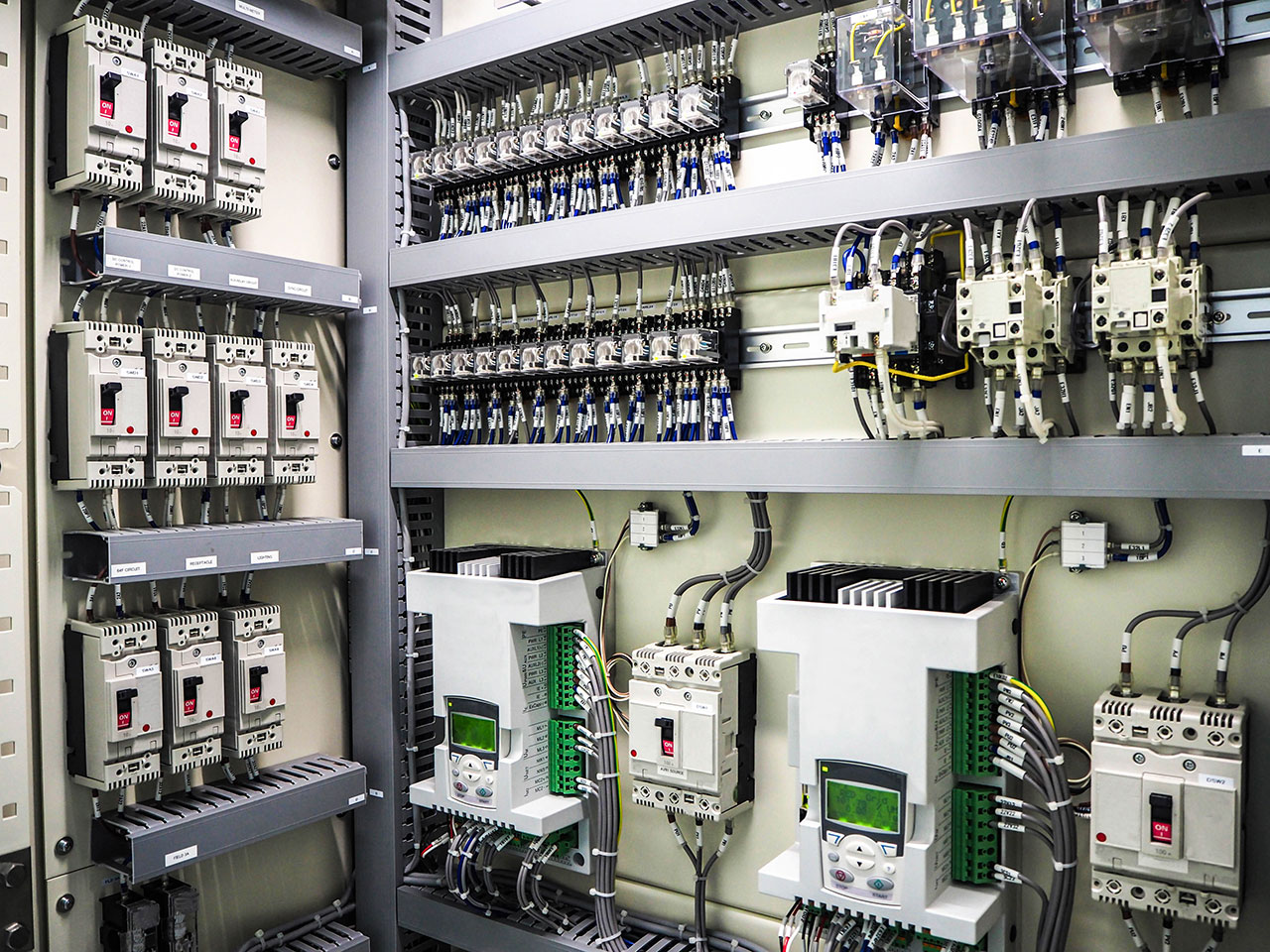 Digi Modbus I/O is a subscription application for DAL OS devices that reads onboard analog and digital I/O and serves it as Modbus TCP registers. In this blog we will discuss use cases and how it can reduce cost and complexity.
Many remote monitoring deployments follow a familiar pattern: a cellular router handles WAN connectivity, and a separate PLC or RTU handles the actual sensor data: reading I/O, exposing a Modbus interface, and feeding data upstream. It works, but it adds hardware cost, cabinet space, and complexity to installations where the sensor count may be modest and the budget is not.
For those situations, Digi's Modbus I/O value-added application offers a compelling alternative. Running directly on supported DAL OS (Digi Accelerated Linux operating system) devices, it reads the device's built-in analog and digital I/O ports and presents those values as standard Modbus registers over TCP/IP, effectively turning the router into a lightweight telematics device alongside its cellular connectivity role.
What Is Modbus I/O?
 DG-PSPY-MBIO), that runs natively on DAL OS. It performs two core functions:
- Reads the onboard I/O ports (both analog and digital) of the host Digi device at a configurable interval.
- Acts as a Modbus TCP/IP server, mapping those I/O readings into Modbus registers that any Modbus-capable client application can query over the local network or cellular backhaul.
There is no separate hardware required, no external Modbus RTU to wire up, and no custom firmware to flash. The application deploys and runs within the Digi DAL Python application framework on the router itself.
Compatible Hardware
Modbus I/O is supported on the following DAL OS devices:
Each of these platforms includes onboard general-purpose I/O (a combination of digital inputs/outputs and, on some models, analog inputs) that Modbus I/O can read and then serve as Modbus registers. If your deployment already uses one of these devices for WAN connectivity, the incremental cost to add sensor monitoring is simply the subscription license and whatever sensors you wire to the I/O terminals.
How It Works
The application flow is straightforward:
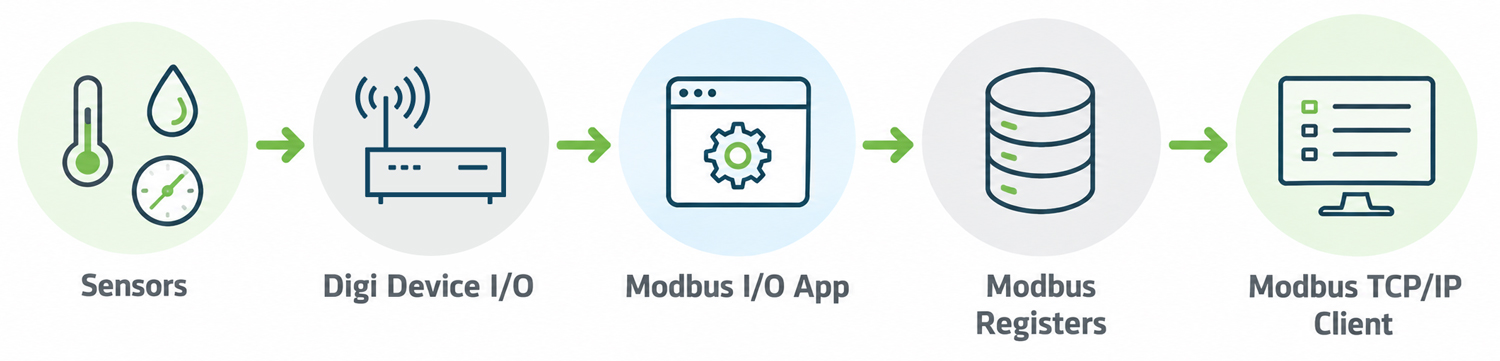
Field sensors (dry contact switches, 4–20 mA current loops, voltage signals, etc.) connect directly to the device's I/O terminals. The Modbus I/O application continuously polls the DAL operating system for the current state of those ports and writes the values into a Modbus register map. Any application with a Modbus TCP/IP client (a SCADA system, a data historian, a custom monitoring app) can then query the device over the network to retrieve live sensor readings using standard Modbus function codes (e.g., Read Holding Registers, Read Input Registers, Read Coils).
From the perspective of the polling application, the Digi router looks exactly like any other Modbus TCP/IP server on the network. No proprietary protocol, no special SDK required on the client side.
The Use Case: Lightweight Remote Monitoring Without a Full PLC
The clearest value proposition of Modbus I/O is cost reduction in deployments where a full PLC or dedicated RTU is otherwise overkill.
Consider a remote pump station, a utility pole cabinet, a water treatment facility lift station, or a small environmental monitoring site. These locations may need to monitor only a handful of signals: a door contact, a float switch, a pressure transducer, or a battery voltage. Traditionally, that still requires an RTU or PLC to aggregate the signals and present them over Modbus, and that hardware has a real cost: purchase price, installation labor, additional power, and ongoing maintenance.
With Modbus I/O, if the site already has a Digi IX25, Digi IX30, IX40 or TX65 router for cellular connectivity, adding sensor monitoring means:
- Wiring sensors directly to the router's I/O terminals (no additional hardware)
- Purchasing the Modbus I/O subscription license
- Pointing the existing SCADA or monitoring application at the router's IP address on Modbus TCP port 502
The router handles both roles (WAN gateway and Modbus I/O server) in a single device, reducing total cost and cabinet footprint.
Part of a Broader Modbus Application Portfolio
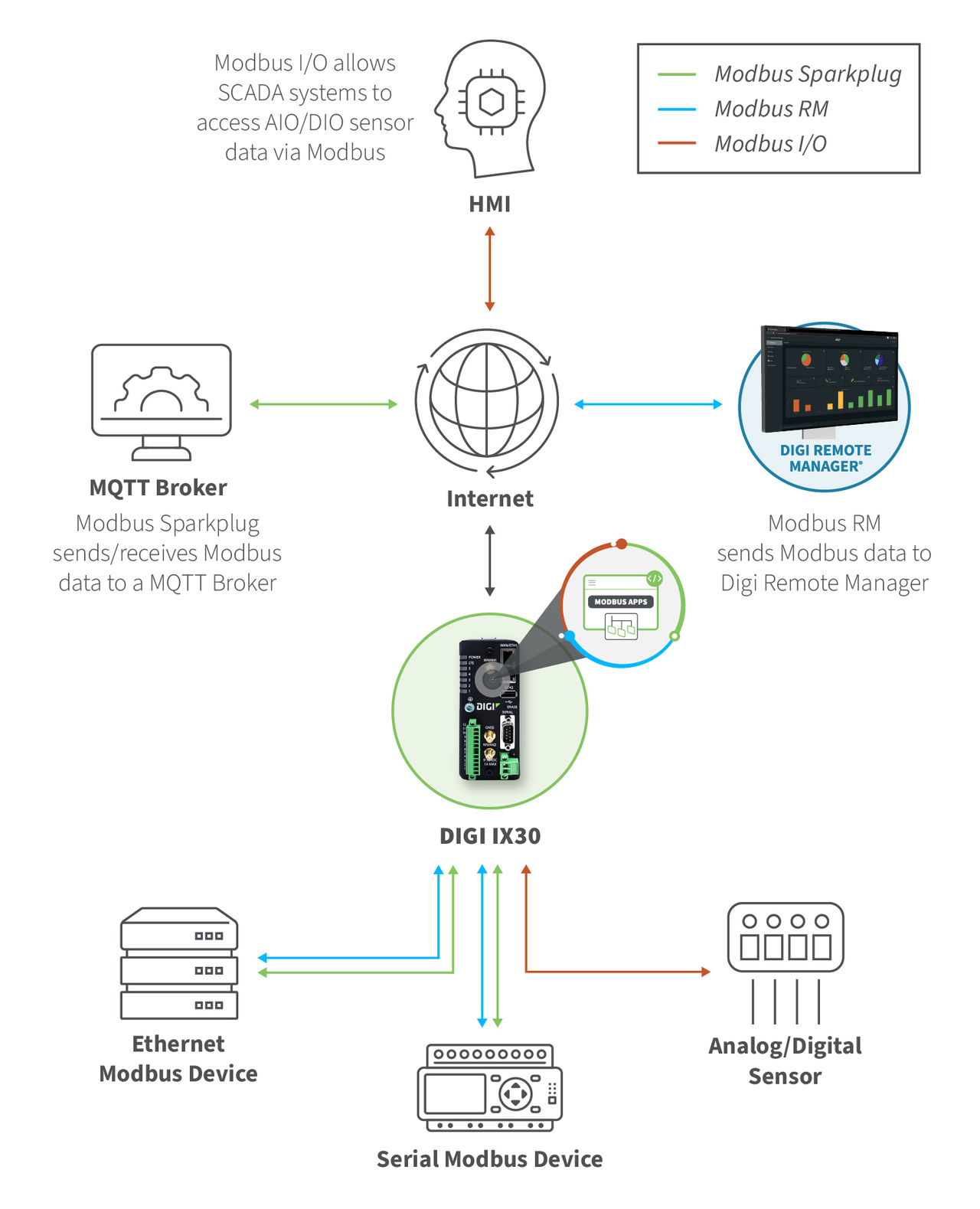
Modbus I/O is one of three Modbus-focused value-added applications in Digi's Professional Services portfolio:
| Application |
What It Does |
| Modbus I/O (DG-PSPY-MBIO) |
Reads onboard I/O ports; acts as a Modbus TCP/IP server |
| Modbus RM (DG-PSPY-MBRM) |
Queries external Modbus devices and forwards data to Digi Remote Manager as a data stream |
| Modbus Sparkplug (DG-PSPY-MBSP) |
Polls external Modbus devices and publishes data to an MQTT broker in Sparkplug B format |
These applications are complementary. A site running Modbus I/O for local I/O monitoring could also run Modbus RM or Modbus Sparkplug to bridge external Modbus serial devices upstream, all on the same DAL OS device.
Licensing and Availability
Modbus I/O is delivered as a subscription license and is available through Digi's standard sales channels and authorized distributors. For pricing, ordering, or to discuss whether the application is a fit for your deployment, contact the Digi Professional Services team at professional.services@digi.com or visit the product pages below.
FAQs About Digi Modbus I/O
What is Digi Modbus I/O?
Modbus I/O (DG-PSPY-MBIO) is a Python-based application that runs on supported DAL OS devices. It reads the device’s onboard analog and digital I/O ports at a configurable interval and presents the values as Modbus registers through a built-in Modbus TCP/IP server.
Do I need a PLC or RTU to expose sensor data over Modbus?
Not for sites with a modest number of signals. Sensors wire directly to the Digi device’s I/O terminals, and the application serves the readings as Modbus registers, so a separate PLC or RTU isn’t required.
Which Digi devices support Modbus I/O?
Digi’s Modbus I/O application supports the Digi IX25 and IX40 5G industrial cellular routers, the Digi IX30 industrial cellular router, the Digi TX65 5G cellular vehicle router, and the Digi Connect EZ 8 I/O and Connect EZ 8 I/O SW serial connectivity devices.
What types of sensors can I connect?
Digital sensors such as dry contact switches, float switches, etc. As well as analog sensors that provide either a 4–20 mA current loop and 0-10v output signal can connect to the device’s I/O terminals. Available input types vary by model, so check the device specifications.
How do I read the data from the Digi device?
Point any Modbus TCP/IP client, such as a SCADA system, data historian or custom monitoring app, at the device’s IP address on TCP port 502. Standard function codes like Read Holding Registers, Read Input Registers and Read Coils are supported.
Can I read the data over a cellular connection?
Yes. The Modbus registers can be queried over the local network or over cellular backhaul.
How is Digi’s Modbus I/O application licensed?
It is sold as an annual subscription license (part number DG-PSPY-MBIO) through Digi’s standard sales channels and authorized distributors.
How is Modbus I/O different from Modbus RM and Modbus Sparkplug?
Modbus I/O reads the device’s own I/O and acts as a Modbus TCP server. Modbus RM (DG-PSPY-MBRM) queries external Modbus devices and sends the data to Digi Remote Manager. Modbus Sparkplug (DG-PSPY-MBSP) polls external Modbus devices and publishes to an MQTT broker in Sparkplug B format. They can run together on the same DAL OS device.