Summary
Legacy serial devices that join IP networks face new risks, including unauthorized access, unencrypted traffic, wider network exposure and limited visibility, but you don’t have to replace working equipment to protect them. Digi Connect EZ serial servers add encryption options, enterprise authentication, firewall controls and Digi TrustFence at the connection point, and you can manage them with Digi Remote Manager or Digi On-Prem Manager. Following five best practices (inventory, access control, segmentation, maintained configurations and encryption) and piloting with a single device helps you modernize serial connectivity safely.
Legacy serial devices that connect to Internet Protocol (IP) networks can expose equipment and data to new security risks, but you do not need to replace working equipment to protect it.
Digi Connect EZ serial servers secure serial-over-IP communications with encryption options, enterprise authentication, firewall controls and
Digi TrustFence, and you can manage your devices from the cloud with
Digi Remote Manager or on premises with Digi On-Prem Manager. This post explains the main risks, how Digi Connect EZ addresses them and five best practices for securing legacy serial devices. Feature availability varies by model, and no individual device guarantees regulatory compliance.
It usually starts with a question during a security review: what is actually connected to our network?
Then someone points to the serial equipment: the controllers, monitoring systems and other mission-critical equipment that connect through RS-232, RS-422 and RS-485. They work. They have worked for years.
But once those devices connect to IP networks for remote access and centralized applications, the rules change. You have to protect data and control access without disrupting the operations that depend on them.
The good news: you don't have to replace anything. You can add security and management at the connection point. Here's how.
First, What Is a Serial Device Server?
A serial device server, also called a serial server, connects equipment that has serial ports to an IP network. Remote applications and users can then communicate with that equipment over the network, even though the equipment has no network interface of its own.
The Digi Connect EZ product family includes serial servers with 1 to 32 serial ports. Depending on the model, Digi also lists them as device servers or terminal servers. The following diagram shows how a Digi Connect EZ server connects serial equipment to the network and to management tools.
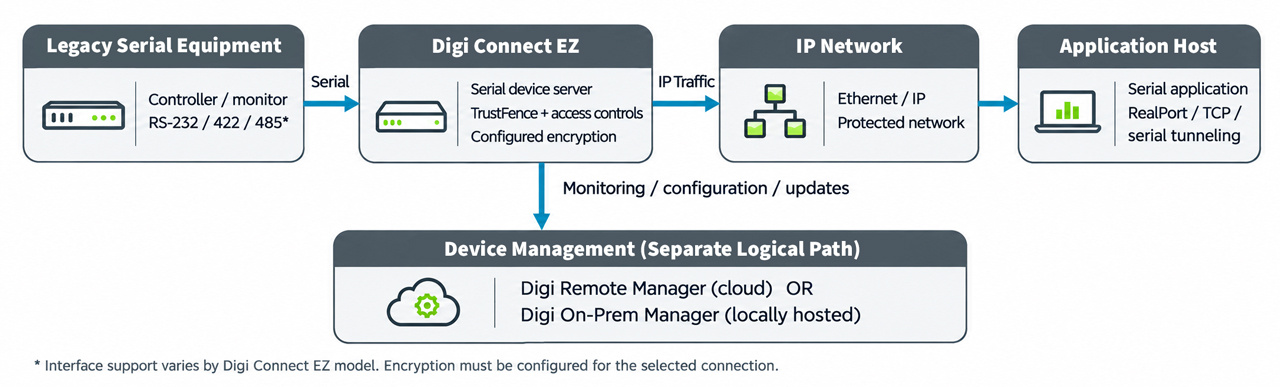
- Serial equipment, such as a controller or monitoring system, connects through RS-232, RS-422 or RS-485.
- Digi Connect EZ serial server, adds network connectivity and security to the serial equipment.
- The IP network carries serial data between Digi Connect EZ and remote systems.
- Applications and management tools, including Digi Remote Manager, communicate with the equipment.
Why Old Serial Connections Become New Risks
Legacy serial devices were built to be dependable, not to defend themselves. Once they join a network, you have to account for limited native encryption or authentication, new network access paths and the challenge of maintaining devices across sites. Four risks stand out:
- Unauthorized access: Legacy devices can have limited built-in authentication, so you have to control which users and systems can reach them.
- Unprotected communications: Attackers can intercept serial traffic that travels over IP without encryption.
- Expanded network exposure: Network connectivity creates additional access paths to previously isolated equipment.
- Limited visibility: Distributed equipment is harder to monitor, configure and update consistently without centralized tools.
None of this means the equipment has failed. It means the connection around the equipment needs to catch up. Not sure where your exposure is today? Start with the inventory in Where to Start, later in this post.

How Digi Connect EZ Secures Serial Connections
Digi Connect EZ protects legacy serial devices as they join modern IP networks. Its security, management and lifecycle support capabilities include:
- Encrypted communications: Digi Connect EZ supports Transport Layer Security (TLS) 1.2 and above, Secure Shell (SSH) and encrypted TCP connections. Configure encryption for each application, because not every connection is encrypted by default.
- Enterprise authentication: RADIUS, TACACS+, Lightweight Directory Access Protocol (LDAP) and digital certificates connect device access to your existing identity management and limit administration to authorized users.
- Firewall protection: A stateful firewall, IP filtering and configurable rules limit access to approved systems and services.
- Secure virtual private network (VPN) connectivity: Internet Protocol Security (IPsec) and OpenVPN create encrypted connections across IP networks.
- Device-level security: Digi TrustFence builds protection into the device itself, including secure boot, and supports encrypted communications and device authentication. It secures the device, not just the data that passes through it.
- Firmware maintenance: Regular firmware updates keep these protections current. Review release notes, test updates against your applications and deploy them consistently across sites.
- Device monitoring and management: Digi Remote Manager provides cloud-based monitoring, configuration and troubleshooting. If your organization restricts cloud access, Digi On-Prem Manager provides a locally hosted management option.
- A complete solution: Digi Connect EZ is part of Digi LifeCycle Assurance, a complete Digi solution that includes the device, remote management, warranty and customer care.
Feature availability varies by model, so confirm details in the datasheet for your model.
Want to see these capabilities on your own equipment? Request a demo of Digi Connect EZ.
Where to Start: Five Best Practices for Securing Legacy Serial Devices
You don't need a massive project plan. Start small, and work through these five practices:
- Inventory connected equipment. Document serial interfaces, communication protocols, application dependencies and authorized network destinations to identify security gaps.
- Control access. Use authentication and firewall rules to limit connections to authorized users, systems and services.
- Segment the network. Keep serial-connected equipment separate from unrelated network traffic and restrict access to management interfaces. The IEC 62443 series of industrial cybersecurity standards applies the same principle by dividing networks into zones with controlled connections between them.
- Maintain and test configurations. Review firmware, document approved security settings and verify application compatibility before you deploy changes across multiple devices.
- Encrypt network communications. Configure encrypted connections, such as TLS, SSH or an appropriate VPN, when you transmit serial data across IP networks.
Then test with a single device. A pilot shows how your applications, serial settings and recovery behavior respond before you migrate more equipment.
For more on this topic, see the Digi blog, Why Your IIoT Devices Belong on a Private Network.
Modernize the Connection, Keep the Equipment
Modernizing a serial connection means updating the layer that connects your equipment to the network, not replacing the equipment. Digi Connect EZ supports serial tunneling, TCP/UDP connections and Digi RealPort COM/TTY port redirection, so compatible applications keep communicating with remote serial devices through familiar interfaces. Before you migrate, validate serial settings, recovery behavior and software compatibility.
Migrating from an earlier Digi serial server? See the Digi PortServer TS migration guide and the Digi One SP migration guide.
The Digi Connect EZ TS models support this transition. They offer four or eight software-selectable RS-232, RS-422 and RS-485 ports. For more information, see the Digi Connect EZ TS serial servers page.
Which Digi Connect EZ Model Fits Your Environment?
Choose a model based on port count, interfaces, environment and management needs. The Digi Connect EZ family includes compact options for a single device and higher-port-count models for dense deployments.
| Model |
Serial ports |
Notes |
| Digi Connect EZ Mini |
1 |
Compact option with a software-selectable RS-232, RS-422 or RS-485 port |
| Digi Connect EZ 2 |
2 |
Two Ethernet ports; LTE model available |
| Digi Connect EZ 4 |
4 |
Wi-Fi, with optional LTE |
| Digi Connect EZ 4i |
4 |
Industrial-rated, with Wi-Fi and optional LTE |
| Digi Connect EZ 8 |
8 |
RS-232 serial server, MEI model adds software-selectable RS-232/422/485; Wi-Fi and I/O variants available |
| Digi Connect EZ 16 and 32 |
16 and 32 |
Higher-density deployments with many serial devices in one location |
| Digi Connect EZ 4 TS and 8 TS |
4 and 8 |
Software-selectable RS-232, RS-422 and RS-485 ports; include Digi LifeCycle Assurance |
Feature availability varies by model. Confirm interfaces, wireless options and security features in the datasheet for your model: Digi Connect EZ Mini/2/4, Digi Connect EZ 8, Digi Connect EZ 16/32, or Digi Connect EZ TS. Digi Connect EZ security features support broader access-control and compliance efforts, but no individual device guarantees regulatory compliance.
When Does Serial Security Become a Priority?
For most teams, it isn't one big moment. It's a combination of signals: an upcoming audit, a new remote-access requirement, or equipment spread across sites with no central view. If you're already asking whether your serial connections are secure, that's the signal to evaluate them.
Bottom Line
Securing legacy serial devices isn't about replacing what works. It's about making sure the connection around your equipment keeps up with everything else on your network. Digi Connect EZ brings together encryption options, enterprise authentication, firewall controls, Digi TrustFence and centralized management, so you can modernize your serial connectivity without replacing equipment that still works.
Frequently Asked Questions About the Digi Connect EZ Family
What is a serial device server?
A serial device server, also called a serial server, connects equipment with serial ports, such as RS-232, RS-422 and RS-485 devices, to an IP network. It lets remote applications and users communicate with that equipment over the network without replacing it. Digi Connect EZ is a family of serial servers.
Is serial over IP secure?
It can be, if you protect it. Serial data sent over IP without encryption can be intercepted, so use encrypted connections, authentication, firewall rules and network segmentation. Digi Connect EZ supports TLS 1.2 and above, SSH, VPN options and enterprise authentication. Protection depends on how you configure each connection.
How do I secure RS-232 devices on a network?
Connect them through a serial device server and apply layered controls: inventory the equipment, limit access with authentication and firewall rules, segment the network, encrypt communications and keep firmware current. The same approach applies to RS-422 and RS-485 devices.
Do I need to replace legacy serial equipment to secure it?
No. A serial device server adds network connectivity and security to the equipment you already have. Digi Connect EZ supports serial tunneling, TCP/UDP connections and Digi RealPort COM/TTY redirection. Test application compatibility and serial settings before you migrate.
Does Digi Connect EZ support encrypted serial-over-IP connections?
Yes. Supported options include encrypted TCP, TLS 1.2 and above, SSH and VPN configurations. Encryption depends on the connection method and its configuration, so configure it for each application.
Can I manage Digi Connect EZ without the cloud?
Yes. Digi On-Prem Manager provides a locally hosted management option for supported Digi devices in environments that restrict cloud management.
Can Digi Connect EZ work with existing serial applications?
Yes. It supports serial tunneling, TCP/UDP connections and Digi RealPort COM/TTY redirection, so compatible applications can reach remote serial devices through familiar interfaces. Test application compatibility and serial settings before you migrate.
What is the difference between a serial server and a terminal server?
Vendors, including Digi, often use the terms interchangeably. Serial server and serial device server usually describe connecting equipment to IP applications, while terminal server often describes access to serial ports on IT and industrial equipment. Digi Connect EZ models appear under both names.
What is Digi Connect EZ TS?
Digi Connect EZ TS is a serial device server with four or eight software-selectable RS-232, RS-422 and RS-485 ports. It is designed for applications where serial-to-IP connectivity is the main requirement. It includes Digi TrustFence device security and works with Digi Remote Manager or Digi On-Prem Manager.
Is Digi Connect EZ TS a replacement for Digi ConnectPort TS and Digi PortServer TS?
Yes. Digi positions Connect EZ TS as the successor to both product lines. It keeps the same mechanical footprint and RJ-45 serial pinout and supports Digi RealPort, so you can usually upgrade without rewiring or changing enclosures. As with any migration, test your serial settings and applications on a pilot unit first.
Do I need to replace my serial cables when I migrate to Digi Connect EZ TS?
No. Digi Connect EZ TS uses the same RJ-45 10-pin MEI serial pinout as ConnectPort TS and PortServer TS, so existing serial cables connect directly. Confirm your cabling and port settings during your pilot.
For teams evaluating a migration, the Digi Connect EZ 4 TS Concept Kit provides a convenient way to test connectivity with existing equipment before deployment. The kit includes a four-port Digi Connect EZ TS serial server, a global power supply, an Ethernet cable and a complete set of serial adapter cables to help simplify testing and validation.
What authentication and connection options does Digi Connect EZ TS support?
Connect EZ TS supports RADIUS, TACACS+ and LDAP for enterprise authentication. For serial data, it supports TCP/UDP connections, serial tunneling and Digi RealPort COM/TTY port redirection. Encryption depends on how you configure each connection. See the datasheet for the options that apply to your deployment.
When should I choose Digi Connect EZ TS instead of another Digi Connect EZ model?
Choose Connect EZ TS when you are replacing a ConnectPort TS or PortServer TS, or when serial-to-IP is your only requirement. Choose another Connect EZ model if you need options such as Wi-Fi or LTE.